> ## Documentation Index
> Fetch the complete documentation index at: https://specterops-feat-poc-api-playground.mintlify.site/llms.txt
> Use this file to discover all available pages before exploring further.
# Ad-hoc BHE Data Collection with SharpHound CE
 ## Purpose
This guide explains how to collect data ad-hoc for BloodHound Enterprise (BHE) using the BloodHound Community Edition (BHCE) collector: SharpHound CE.
It should be used by BloodHound Enterprise users who cannot deploy [SharpHound Enterprise](/install-data-collector/install-sharphound/system-requirements), for example in:
* Environments with no internet access, such as SCADA or OT environments
* Merger and acquisition scenarios, to assess risk before integration or consolidation of IT infrastructure
* Quick deployment scenarios, to get an initial assessment before a full SharpHound Enterprise deployment
Note that SharpHound CE may require allow-listing in endpoint protection solutions, as it is unsigned and will likely be flagged as malicious.
SharpHound CE collects the same data as SharpHound Enterprise since they both use the same collection library. However, SharpHound CE does not support integration with the SaaS portal for a status overview and easily configurable schedules for continuous automatic collection and upload.
## Prerequisites
* Logged in as a user role, which is authorized to perform file ingest, see [Administering users and roles](/manage-bloodhound/auth/users-and-roles)
* Access to an account and computer in the in-scope domain or a domain trusted by the in-scope domain
## Process
### Perform SharpHound CE data collection
1. Download the latest version of SharpHound CE from [GitHub releases](https://github.com/SpecterOps/SharpHound/releases/latest)
2. Choose a data collection method
* `DCOnly` is the recommended starting method and is equivalent to BHE's Active Directory Structure Data + Certificate Services
* `All` performs all collection methods
* Learn about collection methods and flags:
* [SharpHound Community Edition](/collect-data/ce-collection/sharphound)
* [All SharpHound Community Edition Flags, Explained](/collect-data/ce-collection/sharphound-flags)
* [SharpHound Data Collection and Permissions](/collect-data/permissions)
3. Start the collection
```
.\SharpHound.exe -c DCOnly
```
4. Once the collection finishes, the output will be a .zip archive containing JSON files
### Upload data to BloodHound Enterprise
1. Log in to BloodHound Enterprise
2. Navigate to the File Ingest page
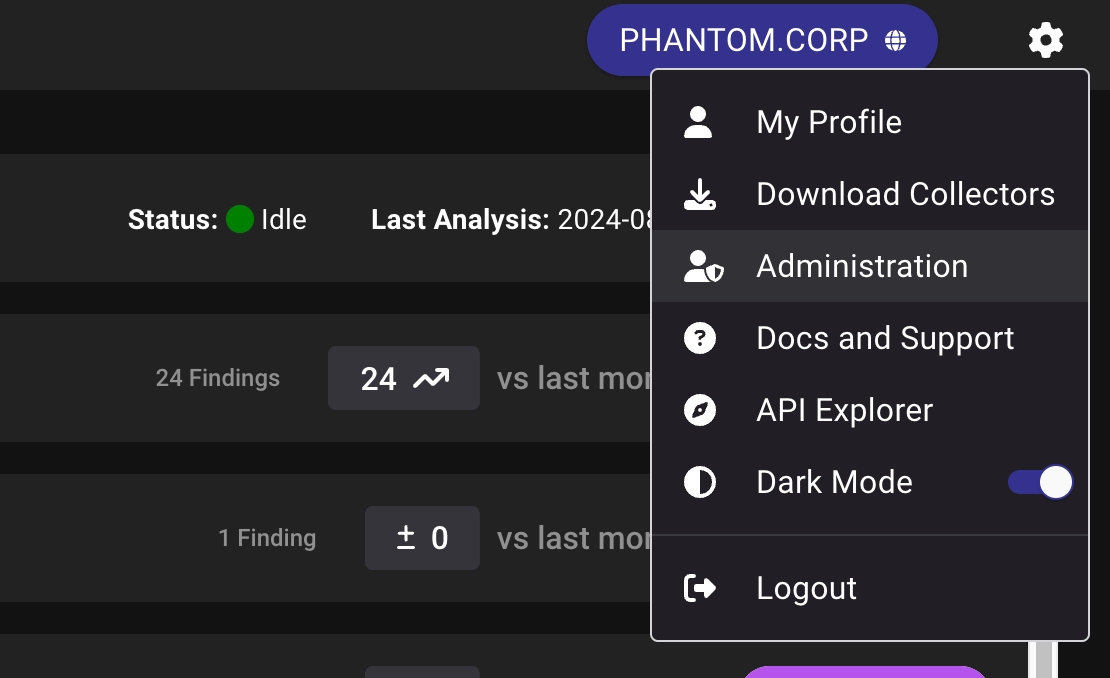
* From the Main Screen, click on the cog wheel in the upper right hand corner
* From the drop down menu, select 'Administration'
## Purpose
This guide explains how to collect data ad-hoc for BloodHound Enterprise (BHE) using the BloodHound Community Edition (BHCE) collector: SharpHound CE.
It should be used by BloodHound Enterprise users who cannot deploy [SharpHound Enterprise](/install-data-collector/install-sharphound/system-requirements), for example in:
* Environments with no internet access, such as SCADA or OT environments
* Merger and acquisition scenarios, to assess risk before integration or consolidation of IT infrastructure
* Quick deployment scenarios, to get an initial assessment before a full SharpHound Enterprise deployment
Note that SharpHound CE may require allow-listing in endpoint protection solutions, as it is unsigned and will likely be flagged as malicious.
SharpHound CE collects the same data as SharpHound Enterprise since they both use the same collection library. However, SharpHound CE does not support integration with the SaaS portal for a status overview and easily configurable schedules for continuous automatic collection and upload.
## Prerequisites
* Logged in as a user role, which is authorized to perform file ingest, see [Administering users and roles](/manage-bloodhound/auth/users-and-roles)
* Access to an account and computer in the in-scope domain or a domain trusted by the in-scope domain
## Process
### Perform SharpHound CE data collection
1. Download the latest version of SharpHound CE from [GitHub releases](https://github.com/SpecterOps/SharpHound/releases/latest)
2. Choose a data collection method
* `DCOnly` is the recommended starting method and is equivalent to BHE's Active Directory Structure Data + Certificate Services
* `All` performs all collection methods
* Learn about collection methods and flags:
* [SharpHound Community Edition](/collect-data/ce-collection/sharphound)
* [All SharpHound Community Edition Flags, Explained](/collect-data/ce-collection/sharphound-flags)
* [SharpHound Data Collection and Permissions](/collect-data/permissions)
3. Start the collection
```
.\SharpHound.exe -c DCOnly
```
4. Once the collection finishes, the output will be a .zip archive containing JSON files
### Upload data to BloodHound Enterprise
1. Log in to BloodHound Enterprise
2. Navigate to the File Ingest page
* From the Main Screen, click on the cog wheel in the upper right hand corner
* From the drop down menu, select 'Administration'
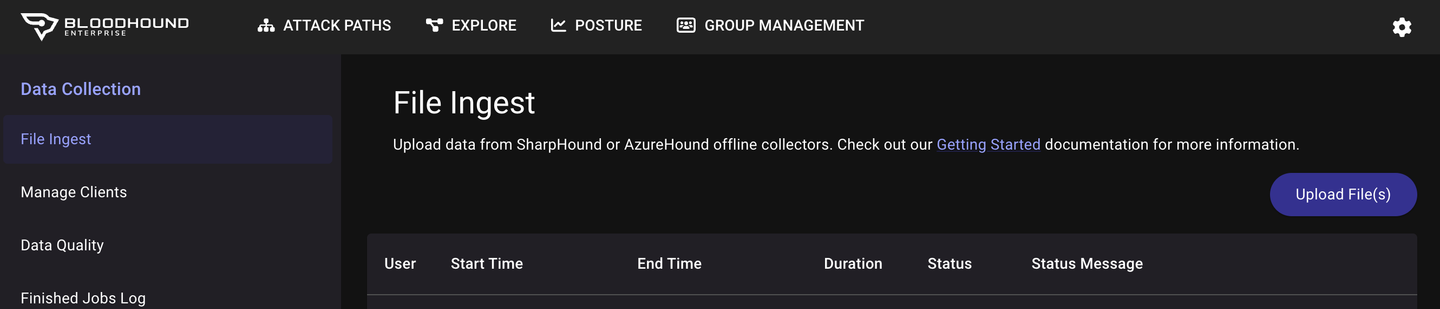
 * In the left margin, select 'File Ingest' under the 'Data Collection' heading
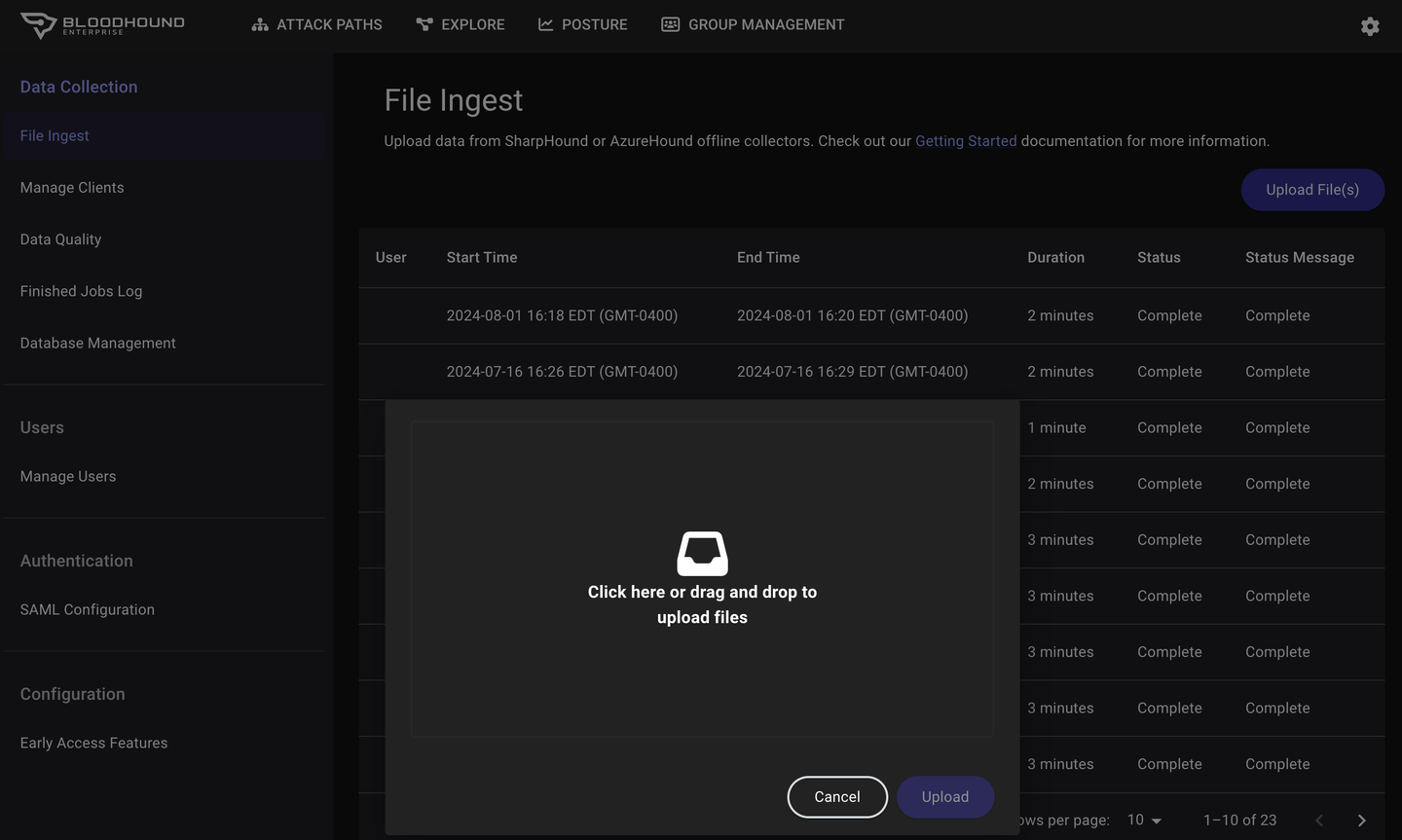
 3. Select "Upload File(s)" and in the pop-up window, drag and drop the output .zip file and select "Upload"
 4. BloodHound Enterprise will parse and process the data, making it available for analysis
### Analyzing Data and Using BloodHound Enterprise Features
* **Dashboard and Visualization:** Review key insights and summaries.
* **Running Queries:** Explore specific security aspects and visualize attack paths.
* **Posture Reporting:** Visualize and track exposure within your Enterprise
### Best Practices for Secure Environments
* **Minimize Data Collection Scope:** Focus on necessary data to limit exposure.
* **Secure Data Handling:** Ensure secure storage and handling of collected data.
* **Regular Updates and Maintenance:** Keep SharpHound CE updated.
## Outcome
Once ingest and analysis is completed, BloodHound Enterprise will present a comprehensive report with actionable recommendations on the Attack Paths page.
4. BloodHound Enterprise will parse and process the data, making it available for analysis
### Analyzing Data and Using BloodHound Enterprise Features
* **Dashboard and Visualization:** Review key insights and summaries.
* **Running Queries:** Explore specific security aspects and visualize attack paths.
* **Posture Reporting:** Visualize and track exposure within your Enterprise
### Best Practices for Secure Environments
* **Minimize Data Collection Scope:** Focus on necessary data to limit exposure.
* **Secure Data Handling:** Ensure secure storage and handling of collected data.
* **Regular Updates and Maintenance:** Keep SharpHound CE updated.
## Outcome
Once ingest and analysis is completed, BloodHound Enterprise will present a comprehensive report with actionable recommendations on the Attack Paths page.